Showing posts with label bloggy stuff. Show all posts

Thursday, February 6

The MLH Creed

My towels don't match.

I mean, I did find four green ones for our open shelving, which gives the impression that I have things more "together" than I do. But I just feel like you need to know that. I don't want you guys to get the wrong idea. It's easy online and in pictures for things to look just right. Crop out the clutter. Angle high so we don't see the floor. Everything in place, everything matching, everything perfect. But that's not life. At least not in the MLH house.
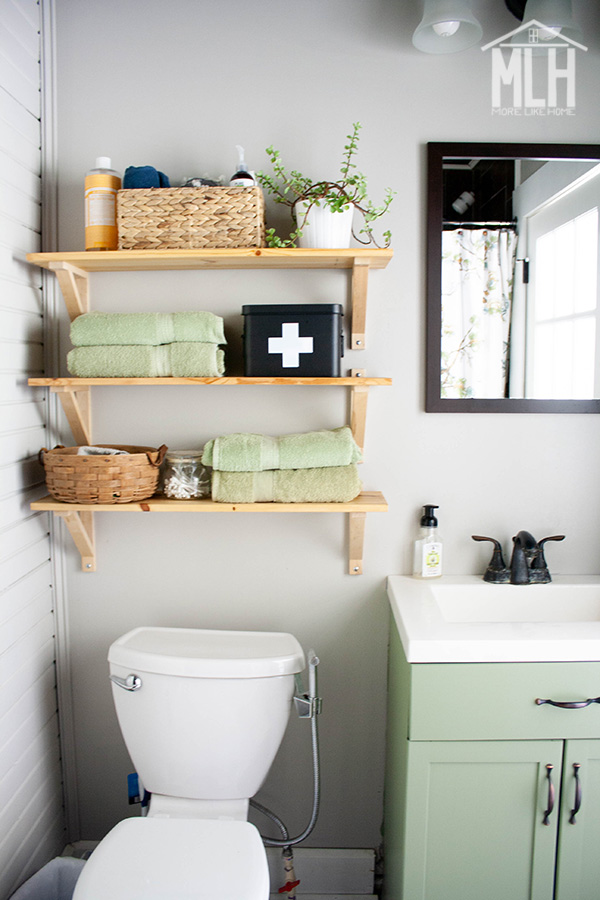
My four almost matching towels.

Don't get me wrong, I love beautiful spaces. I love when my house looks cute and at least somewhat put together. I get bored and want to mix things up. I like to decorate and paint. I like everything to have it's own place and fit perfectly and be always tidy. I like order and neatness. So that's the stuff I blog about. But whatever you read from me, I hope you take what I say with this grain of salt:

It's okay if it's not. And it's okay if you don't.

It's okay if you don't do everything, if it's all not perfect, if your towels don't match. It's okay if you don't have a new couch, if you never replace that tile you don't care for. It's okay to be okay with the way things are. Even if it's a little less than perfect.

Life is so much more than pictures of pretty houses. 

Monday, July 22

31 Day Series Planner {free printable!}

Has anyone else done a month-long series before? I've jumped in on the Nester's link up in October the last couple years (2012 and 2011) and I'm hoping to make it again this year. But with a tiny baby around I know I'll need to do some serious planning to actually make it happen. So I made up this planning guide to help me organize my ideas, schedule, and post details.


And the best part is... I made it printable. So you can start planning too!


Choose a topic or title for your series, use the calendar to schedule a specific post or topic for each day of the month, and use the check box to mark when a post is totally ready to go so you know at a glance what still needs work.


Tuesday, September 25

Custom and Two-Domain Pin It Buttons

This post was written by my husband, N. I hope you find it useful! -Georgia

This post has been pinned (loading...) times.

I know this is a bit of a diversion from what Georgia usually writes about, so regular readers will probably just skip over this post. That's ok! This post is for bloggers (or website owners) who want to do something special with the "Pin It" button from Pinterest. Just think of it as a different kind of DIY....

Lately, Pinterest has been our top source of traffic. As I'm writing this, the most-pinned post on MoreLikeHome.net is the Outdoor Sectional. As of RIGHT NOW, it has been pinned 65,000 times. Pretty cool, right? For two reasons...first of all, because that's a lot of pins, secondly because that number is dynamic. Go ahead, refresh the page and see if it changes (it may take a few minutes for another person to pin it, or you could pin it yourself).

I've come up with a way to customize the output of the Pin It button in a few ways. First, as you saw above, it can output as simple text. You can insert this text anywhere, opening the possibility of making any kind of custom button you can think of with the number attached. Second, the number of pins can output as a complete number instead of the classic "65k+" output that is the only option Pinterest gives. (The "Vertical" layout is fixed-width, so it shows the full number until it passes 99,999, then it reverts to 100K+)

The number of pins in any post on MoreLikeHome.net is actually a composite of two numbers...pins from www.morelikehome.net and pins from morelikehome.blogspot.com. As the blog grew, we decided it would look more professional to have a custom domain, and changing domains meant losing all those pins. If we wanted the Pin It button to show the full count of pins, we would have to do something like this, showing both:

when I want it to say the total 

Another problem with the standard pin it button is it doesn't combine the pin counts associated with your site WITH and WITHOUT the leading "www". As an example, I checked one of our favorite blogs, ana-white.com, because they have a pin it button that says 47K+.  When I tested it both ways I found:

         ana-white.com/ - 47,767 pins
www.ana-white.com/ - 595 pins

It's not a lot, but the button should say 48K+.

Pinterest doesn't offer a solution for either of these problems, and they have no meaningful customer service, so I came up with a solution myself. And you're welcome to use it!  Here's how:
Subscribe
